L AI communication & collaboration

Every conversation connected. Every next action handled.

Bring AI voice, website chat, shared email, team channels and direct messages into one CRM-embedded workspace. Agents answer enquiries, understand customer context, update records, coordinate teams and carry out the next approved action — without conversations getting trapped in separate inboxes.
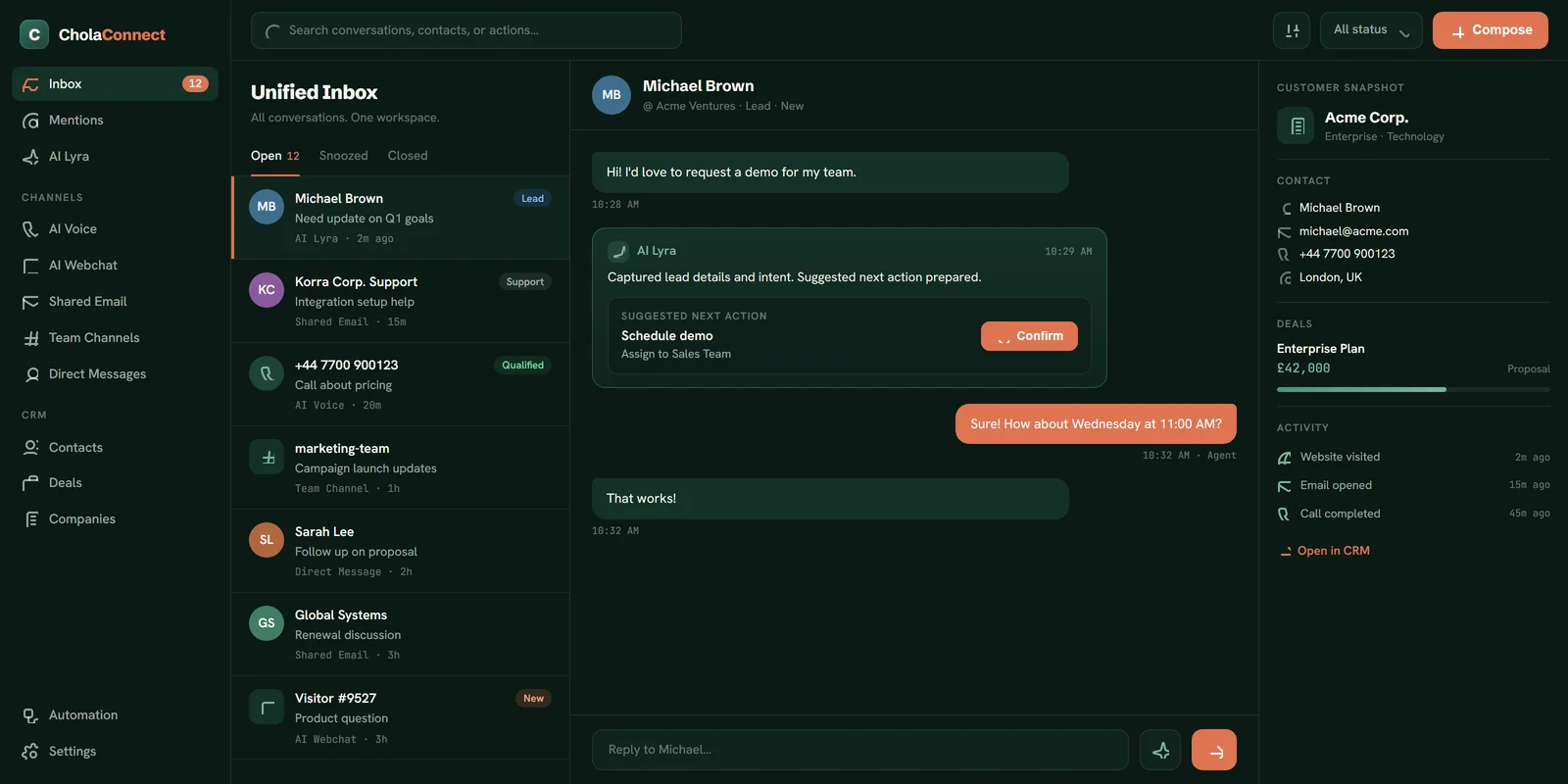
Start with AI-assisted replies. Increase autonomy when your policies and results support it.
app.cholaverse.com/inbox
CholaConnect unified inbox — AI voice, webchat, email and team channels answered in one workspace
AI Voice AI Webchat Shared Email Team Channels Direct Messages Embedded CRM
Communication built for execution

Most tools move messages. CholaConnect moves the work forward.

Customers communicate by call, chat and email. Employees work in channels, direct messages and threads. Sales works from CRM records, service from queues, operations from tasks and orders. When those systems are disconnected, information is copied by hand, conversations repeat and actions get missed. CholaConnect connects every customer conversation to the right contact, company, opportunity, quote, order or issue — and every agent works from the same live context.

Listen
Understand
Respond
Act
Record
Follow through
One place for customers, teams and AI agents

Four kinds of conversation, one workspace.

Customer communication
Customers reach you by voice, webchat, email and other enabled channels. Agents answer immediately, collect information, resolve approved requests, qualify opportunities or transfer to the right person.
Team collaboration
Employees work through department channels, project spaces, account rooms, direct messages and threads — sharing files, mentioning colleagues and connecting discussions to CRM records.
AI agent collaboration
Agents are active members of the workspace. Mention one in a channel, assign it a conversation or let it monitor a queue; it researches, summarises, drafts, updates records and takes approved actions.
CRM context
Every interaction links to CholaFlow. The workspace and CRM share the same customer context, reducing manual logging and helping everyone understand the complete relationship.
See CholaConnect work

One conversation, moving across chat, voice, email and CRM.

NEW WEBSITE CONVERSATION · RETURNING CUSTOMER
“We need another 80 units for our new location. Can you confirm availability and send an updated quote?”
01
Identify the customer
The webchat agent securely matches the visitor to a CRM contact — company, account owner, previous orders, open opportunities and recent conversations all visible.
Customer recognised
Existing business customer with two previous orders and an active account manager.
02
Understand the request
It identifies three requirements — check availability for 80 units, confirm the required delivery date, prepare an updated quote — and asks for the missing delivery date rather than assuming.
03
Check the wider business context
The agent reviews available inventory, existing reservations and confirmed inbound stock: 60 units available now, another 40 expected before the required date.
Agent finding
The full requirement can be fulfilled, subject to the expected inbound delivery arriving on schedule.
04
Continue by voice
The customer asks for a call. The AI voice agent receives the full webchat context before it begins, so the customer never re-explains, and confirms delivery location, timing and decision process.
05
Update the CRM
During the call it updates the delivery requirement, creates an 80-unit opportunity with expected value, adds the next action, links the chat and call to the opportunity, and assigns the account owner.
06
Coordinate the team
The requested terms exceed the agent\u2019s approval limit, so CholaConnect opens an internal opportunity thread and mentions the account manager — with request, summary, inventory position and proposed pricing attached.
Internal thread
The employee can approve, edit or reject the proposal without searching separate systems.
07
Send the follow-up email
After approval, the agent prepares and sends the quote through the existing customer email thread, reflecting the discussion, confirming the delivery plan and stating the agreed next step.
08
Continue monitoring
It watches the thread for a reply. When the customer responds, the opportunity updates and the owner is notified; if no reply arrives by the agreed date, the agent prepares the follow-up.
09
Preserve the complete history
Webchat, voice, internal approval and customer email all appear in one CRM relationship timeline — what was requested, promised, approved and what must happen next.

One customer. One conversation history. One accountable workflow.

Not connected to CRM. Embedded inside it.

Communicate with the customer record beside you.

No switching between a communication tool and a separate CRM screen. While handling a call, chat or email, employees and agents see the relevant context — and the record becomes part of the conversation, not something updated later from memory.

Customer identity
Name, company, role and preferred communication details.
Relationship ownership
Account owner, sales rep, service team and internal stakeholders.
Lead & opportunity
Lead status, qualification, stage, expected value and next action.
Commercial activity
Quotes, pricing discussions, products of interest and past purchases.
Order context
Open orders, fulfilment status, returns and delivery information.
Service history
Open issues, previous complaints, resolutions and feedback.
Conversation history
Previous calls, chats, emails, internal notes and agent actions.
Tasks & commitments
Upcoming meetings, promised follow-ups, deadlines and outstanding work.
Every channel, one context

Voice, webchat, email and team channels — working together.

V
AI Voice
Give every call an agent with full customer context — handling inbound calls and approved outbound workflows, not just routing.
·Lead capture, qualification and appointment booking
·Order enquiries and quote follow-up with verified data
·Customer-service triage and intelligent call routing
·Warm human handover with full context, plus after-call work
W
AI Webchat
Turn your website into an active customer and sales channel that answers, qualifies and acts from approved knowledge and live data.
·Answer product questions and capture / qualify leads
·Identify existing customers and create opportunities
·Retrieve approved order info and book demonstrations
·Adapt to page context; hand over to an employee on request
E
Shared Email
Bring hello@, sales@, support@, accounts@ and orders@ into one workspace, kept as threads and linked to the right record.
·AI triage: intent, urgency, priority, owner, next action
·Draft responses from CRM context and approved knowledge
·Private internal notes without adding to the customer thread
·Send permitted replies automatically; route sensitive ones
T
Team Channels
A shared workspace for people and agents — department, project, account, opportunity and incident spaces, plus DMs and threads.
·Public / private channels, threads, mentions, reactions, files
·Mention agents to summarise, research, draft or update records
·Auto-created rooms for high-value or urgent events
·Search, pins, saved messages and notification controls
AI agents inside team channels

Mention an agent just like a colleague.

@SalesAgent summarise this opportunity and recommend the next action.
@SupportAgent review the customer\u2019s previous issues before we respond.
@InventoryAgent confirm whether 200 units can be delivered next month.
@FinanceAgent check whether this invoice has been paid.
@MeetingAgent find a suitable time for everyone involved.
@CRMagent update the opportunity and create a follow-up task for Friday.

The agent responds inside the thread, presents the relevant context and carries out only the actions its permissions allow.

One connected workspace

Everything needed to run every conversation.

Unified inbox
Voice callbacks, active webchats and email threads in one queue — channel, customer, owner, intent, priority, status, deadline and recommended action at a glance.
Shared ownership
A conversation can sit with an employee, an agent, a team queue, or be shared, escalated to a specialist, then returned to automation — ownership stays visible throughout.
Intelligent routing
Route by identity, account owner, source, intent, product, priority, value, language, skill, urgency, workload and hours. Routine to an agent; sensitive to a person.
Continuous cross-channel
A customer can start on webchat, continue by voice and get confirmation by email — the next person or agent sees what was requested, answered, verified, done and promised.
Conversation intelligence
Turns calls, chats and emails into structured signals: intent, buying signals, objections, commitments, competitor mentions, decision dates and required actions.
Conversation summaries
Concise summaries of a live conversation, a full email thread, an account history, an opportunity or an internal discussion — always linked back to the original detail.
Every conversation becomes context

Every request becomes action.

Give customers, employees and AI agents a single place to communicate — with the CRM record and the next approved action always in reach.

Put a communication agent to work Book a demonstration
CholaVerse

The AI-native business operator. Your people set the direction; AI agents work alongside them to execute.

20–22 Wenlock Road,
London, N1 7GU, UK
Facebook LinkedIn YouTube X Instagram
XOPS
Sales Operations Customer Service Marketing Finance Human Resources Business Intelligence
PRODUCTS
CholaFlow · CRM CholaStock · Inventory CholaShip · Shipping CholaConnect · Communication CholaPlanner · Tasks CholaDrive · Storage CholaGrowth · Marketing CholaBooks · Finance CholaPeople · HR Compare
INDUSTRIES
E-commerce Retail Logistics Healthcare Hospitality Insurance Brokers All industries →
COMPANY
About CholaVerse Become a partner Affiliate programme Pricing Contact
RESOURCES
Why XOPS? Learn & guides Implementation Department guide Help centre Blog
POLICIES
Terms & conditions Privacy policy Sitemap
© 2026 CholaVerse. All rights reserved.
Privacy Policy | Terms | Contact | Blog | Sitemap